



Know where your family is. Be ready for the day something goes wrong.
VantageIQ Guardian keeps your family's people, places, belongings and emergency information in one private place. You see where everyone is, you are told when something needs you, and you have what the police will ask for if someone or something goes missing.
- 14 days free, no card
- Location only with each person's yes
- A record of who saw what
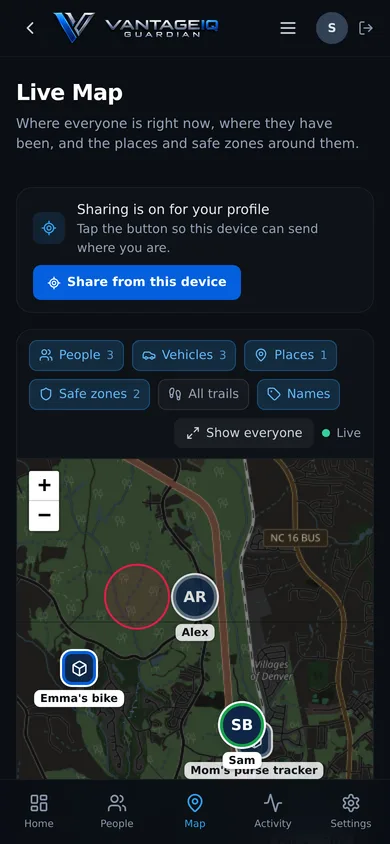
Shown with a made-up family.
Any phone
Works on iPhone and Android, in the browser
Opt-in
Location is shared only when each person agrees
One PDF
With what the police ask for
90 days
Then location history is deleted
The real screens, not drawings of them
Pick a screen. Every picture on this site is the app itself.
Who is where, what needs your attention, and what is on today.
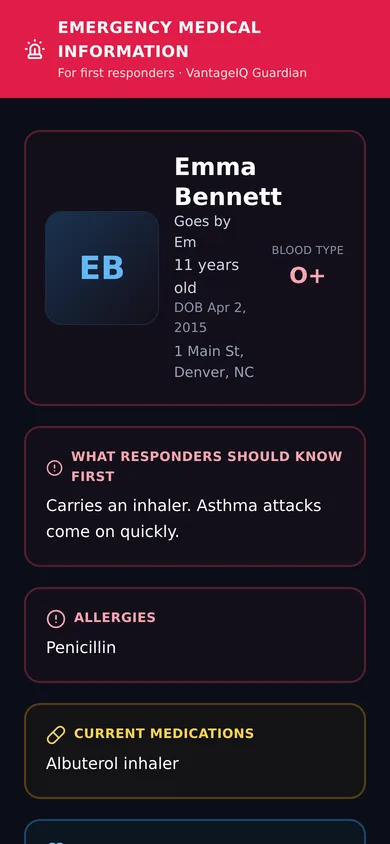
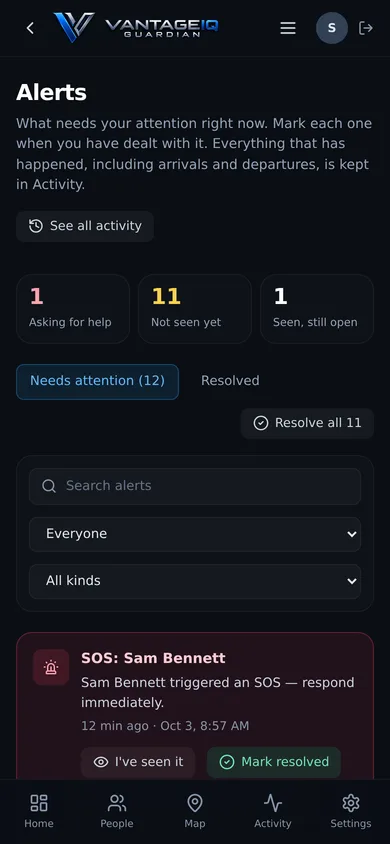
Shown with a made-up family. Select a picture to enlarge it.
Everything about your family in one place
Who is where, what is coming up, and what needs renewing.
Live Map and Daily Timeline
Where everyone was last seen, and each day as stops and trips.
Safe Zones
A circle around home or school, and an alert when someone leaves it.
Alerts and SOS
One press asks the family for help. Alerts for a missed check-in, a low battery, fast driving, or movement that is out of the ordinary.
People
A profile for everyone in your family: photo, emergency contacts, medical details, and their own login.
Documents and reminders
Passports, licenses and policies in one private place, with reminders before they expire.
Vehicles, valuables and home
Plates, VINs, serial numbers and photos of what you own, and one list of your home's cameras and alarms.
What you need, already in your hands
The details that are hard to find in a bad moment are the ones you entered on a calm day.
Missing Person Report
One PDF with a person's photo, description, contacts, places and vehicles, ready to hand to the police.
Theft mode
Mark a vehicle or valuable stolen. If it carries a tracker, your family is told when it moves, and a police report is one press away.
Emergency information
A private link to one person's allergies, medications and emergency contacts, for a paramedic to open without a login. You are told each time it is opened.
Incident log
Write down what happened, keep the photos and the report number with it, and follow it until it is closed.
Ready in three steps
01
Add your family
Add each person with a photo, emergency contacts and medical details. Give the adults and teenagers their own login.
02
Turn on location sharing
Each person agrees on their own phone before anything is shared. Then draw a safe zone around home or school.
03
Be told when it matters
Guardian tells you when someone leaves a safe zone, asks for help, misses a check-in, or is somewhere out of the ordinary.
What Guardian is, and what it is not
A safety product should not leave these to be guessed.
Guardian does not call 911
It tells your family. In an emergency, call 911 first.
Nobody is watching your map
There is no monitoring center. Alerts go to the parents and guardians in your family, by email.
Location needs each person's yes
A person's location appears only after they agree on their own phone, and they can stop at any time.
All-day location uses a second app
In a browser, a phone can share its location only while Guardian is open. For all-day sharing, Guardian sets up a free app called OwnTracks.
One plan covers the whole family
14 days free for every new family. No card needed. Then one monthly plan. Cancel when you like.
Try Guardian with your own family
14 days free for every new family. No card needed.