



Set up in an evening, useful from the first day
Guardian runs in the browser on any phone, tablet or computer. Here is how a family gets started, and exactly what location sharing can and cannot do.
01
Add your family
Add each person with a photo, emergency contacts and medical details. Give the adults and teenagers their own login.
02
Turn on location sharing
Each person agrees on their own phone before anything is shared. Then draw a safe zone around home or school.
03
Be told when it matters
Guardian tells you when someone leaves a safe zone, asks for help, misses a check-in, or is somewhere out of the ordinary.
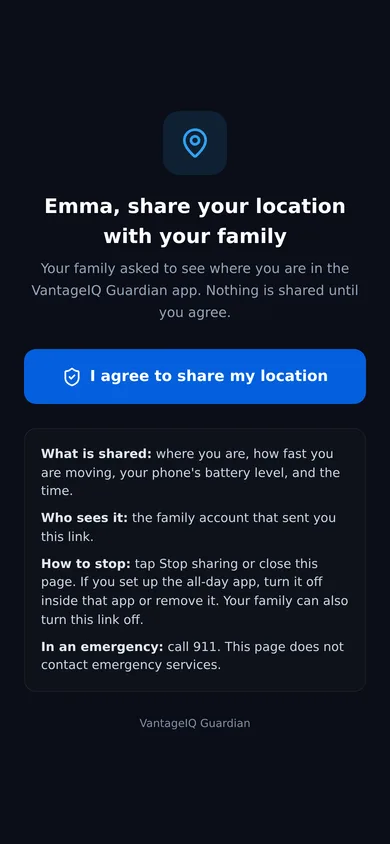
Each person says yes on their own phone
A parent creates a sharing link on a person's profile. That person opens it, reads what is shared and who sees it, and agrees. They can stop at any time.
What it can do
- Show each person's position on the map after they agree on their own phone.
- Share while Guardian or the sharing page is open on the phone, with nothing to install.
- Share all day, in the background, once the free OwnTracks app is set up. Guardian gives the steps.
- Follow a vehicle by its driver's phone, by a spare phone left in the car, or by a GPS tracker that can send its position to a web address.
What it cannot do
- See a phone that is switched off or has no signal. The map shows where it was last seen, and when.
- Read Apple AirTag, Tile or Samsung SmartTag locations. Those companies do not share them with other apps.
- Share anyone's location without their agreement, or keep sharing after they stop.
- Show video from your cameras. Guardian lists your devices and raises alerts from them.
What Guardian is, and what it is not
Guardian does not call 911
It tells your family. In an emergency, call 911 first.
Nobody is watching your map
There is no monitoring center. Alerts go to the parents and guardians in your family, by email and, for urgent ones, by text.
Location needs each person's yes
A person's location appears only after they agree on their own phone, and they can stop at any time.
All-day location uses a second app
In a browser, a phone can share its location only while Guardian is open. For all-day sharing, Guardian sets up a free app called OwnTracks.
Try Guardian with your own family
14 days free for every new family. No card needed.